
Export/Import & Record Traffic
When debugging APIs or webhooks, context is everything, but that context is often temporary and short-lived.
- Requests disappear once they are processed
- Debugging happens across machines, teams, or time zones
- Reproducing issues requires replaying entire request histories
- Sharing “what actually happened” is harder than sharing logs or screenshots
Inspectr allows you to export all captured operations — requests, responses, metadata, and context into a structured JSON file.
That file can then be:
- Stored outside Inspectr
- Shared with teammates
- Imported into another Inspectr instance
- Reviewed for debugging or investigations
This turns Inspectr into more than a live debugger; it becomes a portable traffic archive.
If you want to automate exports (for example, export on shutdown), jump to Automation: CLI & YAML.
Exporting Operations
Section titled “Exporting Operations”You can export operations at any time from the Request History view.

In the top navigation bar, you can find the buttons: Export, Import and the Recording toggle.
To export operations, click the Export button, which opens a modal.
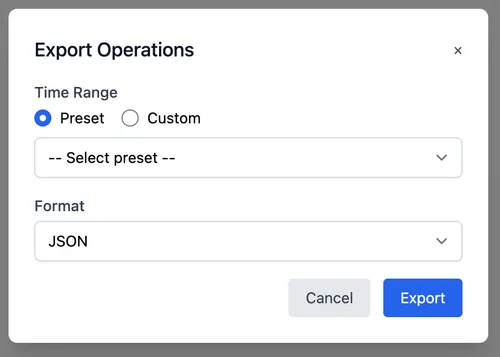
Time Range Options
Section titled “Time Range Options”Inspectr supports two export modes:
Preset Range
Section titled “Preset Range”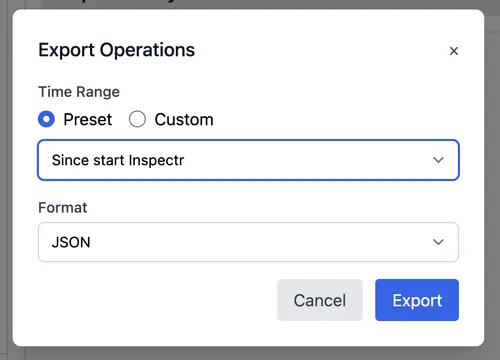
Export everything captured since:
- Last hour
- Last 24 hours
- Last 7 days
- Last 30 days
- Since start Inspectr
- Since first operation
This is ideal for quick exports based on logical time periods.
Custom Range
Section titled “Custom Range”Define an explicit start and end time to export only the relevant slice of traffic.
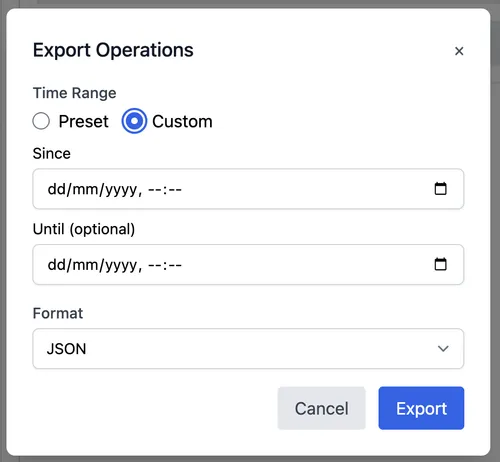
This is ideal when:
- Investigating a specific incident
- Exporting traffic from a test run
- Sharing only the minimal reproduction set
Export Format
Section titled “Export Format”The export format JSON, is a portable, Inspectr-native structure containing:
- Request & response data
- Headers and payloads
- Timing & metadata
- Correlation context
The exported file is fully compatible with Inspectr’s import feature.
Importing Operations
Section titled “Importing Operations”Exported files can be loaded into any Inspectr instance.
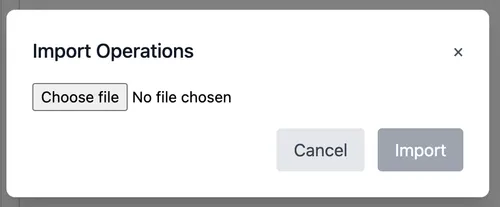
Once imported:
- All operations appear in Request History
- Tracing, filtering, and inspection behave exactly the same
- No live traffic or backend is required
This makes Inspectr a powerful review and analysis tool, not just a proxy.
Record Mode
Section titled “Record Mode”Export becomes even more powerful when combined with Record Mode.

What Is Record Mode?
Section titled “What Is Record Mode?”Record Mode allows you to:
- Explicitly start capturing incoming traffic
- Clearly define when recording begins and ends
- Export only what was recorded during that session
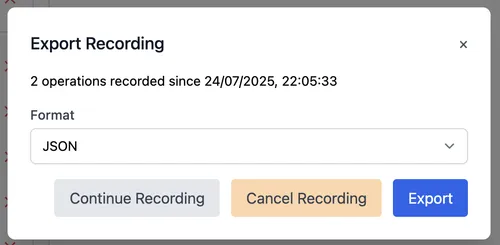
This is especially useful when:
- Running automated test suites
- Capturing webhook deliveries
- Debugging transient production issues
- Collecting traffic for later analysis or sharing
Think of it as a session recorder for API traffic.
Example Workflow
Section titled “Example Workflow”- Enable Record Mode
- Trigger webhooks or API calls
- Stop recording once the scenario completes
- Export recorded operations as JSON
- Import them into another Inspectr instance
- Inspect, trace, and analyze — without touching the original system
Typical Use Cases
Section titled “Typical Use Cases”- Sharing Issues with Teammates Export the exact traffic that caused a bug and let others inspect it locally — no backend access required.
- Test & QA Reviews Capture requests during a test run, export them, and review behavior offline or in CI/CD workflows.
- Archiving & Auditing Store request histories outside Inspectr for compliance, audits, or long-term reference.
- Cross-Environment Debugging Capture traffic locally, import it on another machine, or replay analysis without re-triggering systems.
- Documentation Use real request data when documenting APIs or explaining flows to new team members.
Automated exports
Section titled “Automated exports”For automated workflows, you can export operations on shutdown using the CLI or .inspectr.yaml.
inspectr --exportexport: trueThis is powered by Inspectr’s export-on-exit option, which writes a timestamped JSON export containing the operations captured during the run. It’s a simple way to turn “what happened” into a portable artifact you can archive, share, or attach to a ticket.
For full details (including export folder and filename format), see: Export Operations on Shutdown →
Automated exports use-cases
Section titled “Automated exports use-cases”- CI / test runs as artifacts Capture traffic during an end-to-end run and publish the exported JSON as a build artifact.
- Repro packs for bugs & analysis Export the exact requests/responses that triggered a problem and import them into another Inspectr instance for review.
- Short-lived sessions with a trail Keep staging smoke tests, nightly checks or load-test sessions without running Inspectr permanently.
Summary
Section titled “Summary”Inspectr’s Export & Import feature lets you:
- Capture real traffic
- Preserve full context
- Share and replay API behavior anywhere