
MCP Server Evals with MCPLab
Introduction
Section titled “Introduction”As MCP (Model Context Protocol) becomes the backbone for agent tooling, prompts, and resources, testing is no longer a simple unit-testing exercise.
Your MCP server is used:
- by different clients (Claude Desktop, Cursor, IDE agents, internal tools)
- with different LLMs (Anthropic, OpenAI, Azure OpenAI, local models)
- across different environments (local, CI, staging, production)
To ship reliable MCP servers, you need confidence that tools, prompts, and resources behave consistently across all of these dimensions.
This guide shows how to combine MCPLab and Inspectr for deterministic evals plus deep runtime inspection.
The Problem: Testing MCP Servers
Section titled “The Problem: Testing MCP Servers”Even if your MCP server works in development, real-world usage introduces variability:
- Tools may be triggered differently depending on the model
- Prompts may be interpreted differently by different LLMs
- Token usage can change drastically between flows
- Some failures only surface in specific environments or clients
Traditional tests do not answer questions like:
- Which tools were actually used by the LLM?
- How many tokens were consumed, and where?
- Why did an eval fail only for one model?
- Did a recent change silently alter agent behavior?
To answer these questions, you need end-to-end testing and MCP visibility.
MCP evaluation with MCPLab
Section titled “MCP evaluation with MCPLab”MCPLab is an evaluation framework for MCP servers. It lets you define scenarios, run them against your MCP server, and compare behavior across agents and models.
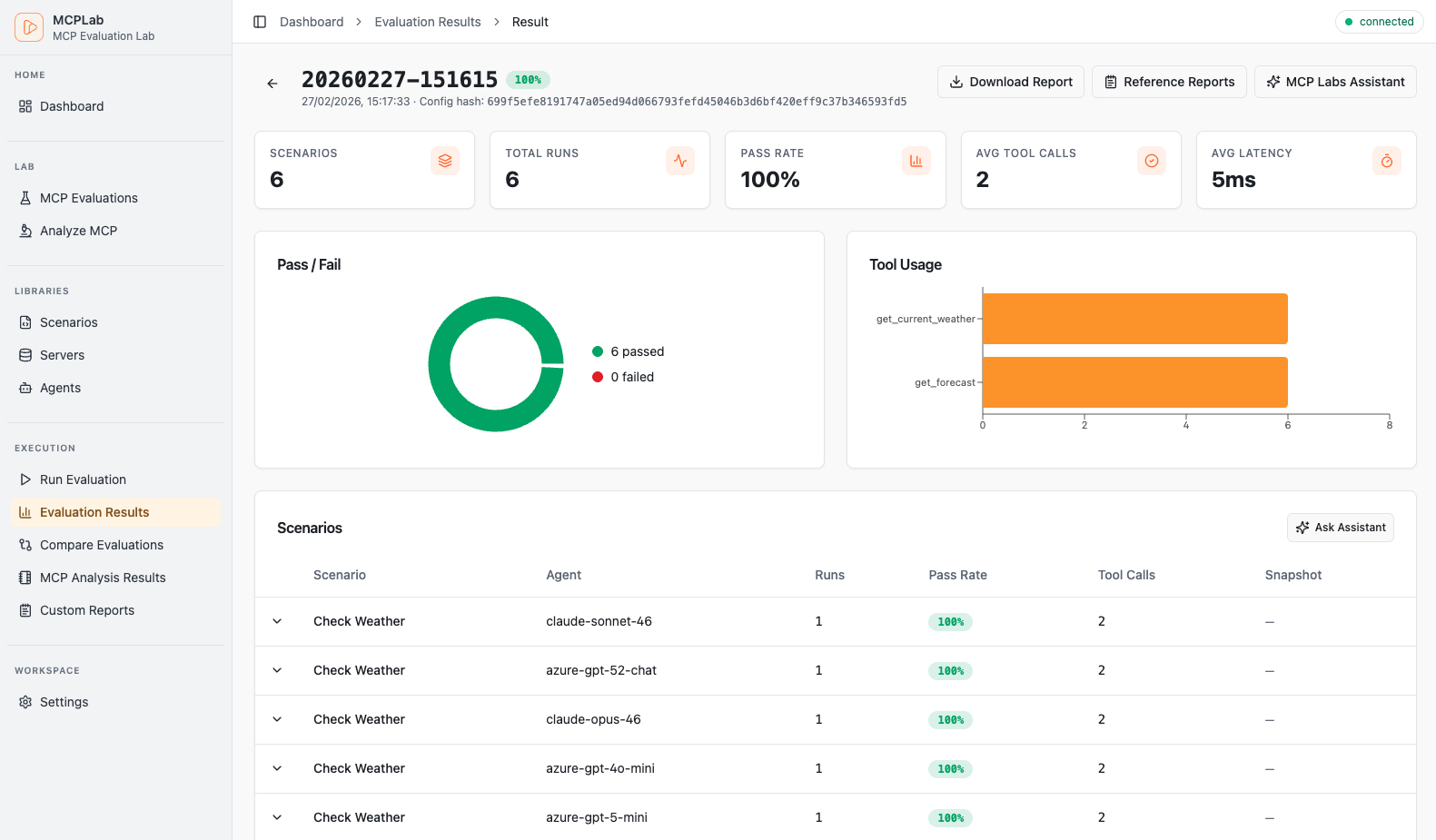
With MCPLab, you define evaluation scenarios that simulate real user interactions:
- tool calls
- prompt exchanges
- resource access
- multi-step flows
These evals validate that your MCP server behaves correctly across:
- different models
- different environments
- different user flows
End-to-End (E2E) testing by design
Section titled “End-to-End (E2E) testing by design”MCPLab performs full E2E testing:
- it acts as an MCP client during the run
- it communicates with your MCP server over HTTP
- it executes representative user journeys and assertions
MCPLab answers the question: “Do agents use my MCP server as expected?”
MCP Tool Usage Visibility
Section titled “MCP Tool Usage Visibility”What evaluation/testing tools intentionally do not provide by default is full traffic observability. The focus is on outcomes, not usage observability.
Evaluation results alone do not explain why something worked or failed.
After a run, you often still need to know:
- which tools were invoked
- how prompts were processed
- how many tokens were spent
- how behavior differed between runs
That is where Inspectr fits in.
Inspectr is a local-first inspection and proxy tool for APIs, webhooks, and MCP traffic. It captures requests and responses in real time, enriches them with protocol-aware insights, and can export full sessions as JSON for later analysis.
Used together, MCPLab + Inspectr give you both:
- evaluation outcomes
- deep visibility into how your MCP server behaved during those evals
The Solution: MCPLab + Inspectr
Section titled “The Solution: MCPLab + Inspectr”MCPLab and Inspectr solve complementary parts of the same problem.
- MCPLab runs deterministic MCP evals and assertions
- Inspectr observes and analyzes MCP traffic in real time
Inspectr runs transparently as a proxy between MCPLab and your MCP server:
Inspectr provides:
- full capture of MCP HTTP requests and responses
- MCP-aware call classification (tools, prompts, resources)
- trace-level visibility for debugging evaluation failures
- token usage estimates per operation
- exportable JSON artifacts for each run
MCPLab was developed by the Inspectr team to close the gap between pass/fail test outcomes and practical debugging insight, and is used intense internally to evaluate the Inspectr MCP server across models.
Prerequisites
Section titled “Prerequisites”Before you start, make sure you have:
- an MCP server running (example:
http://localhost:3000/mcp) - Node.js installed
- Inspectr installed (Installation guide →)
- at least one LLM API key configured (for example
ANTHROPIC_API_KEYorOPENAI_API_KEY)
Step 1 — Launch Inspectr with your MCP server
Section titled “Step 1 — Launch Inspectr with your MCP server”Run Inspectr as a local proxy with export enabled:
inspectr \ --backend http://localhost:3000 \ --exportWhy this matters:
- Inspectr captures MCP traffic during a scenario run
--exportwrites a JSON archive when Inspectr stops- this is useful for reproducible local and CI runs
Step 2 — Install MCPLab CLI
Section titled “Step 2 — Install MCPLab CLI”Use MCPLab via npx or install it globally:
# One-off usagenpx @inspectr/mcplab --help# Install globally to get the `mcplab` commandnpm install -g @inspectr/mcplabFor more examples and updates, see the MCPLab repository.
Step 3 — Create an evaluation config that targets Inspectr
Section titled “Step 3 — Create an evaluation config that targets Inspectr”Create a file like my-eval.yaml and set your server URL to Inspectr’s local endpoint:
servers:  my-server:    transport: "http"    url: "http://localhost:8080/mcp"
agents:  claude:    provider: "anthropic"    model: "claude-sonnet-4-6"    temperature: 0    max_tokens: 2048
scenarios:  - id: "basic-tool-check"    agent: "claude"    servers: ["my-server"]    prompt: "Use the available tools to complete the task."    eval:      tool_constraints:        required_tools: ["my_tool"]
No changes are required on your MCP server itself.
Step 4 — Run MCPLab evals
Section titled “Step 4 — Run MCPLab evals”Run your evals as usual:
npx @inspectr/mcplab run -c my-eval.yamlWhile the eval runs:
- Inspectr shows MCP traffic live
- requests and responses can be inspected per operation
- failures are easier to debug with trace context
Step 5 — Review exports and run artifacts
Section titled “Step 5 — Review exports and run artifacts”When the scenario run is complete, stop Inspectr.
Because export mode was enabled:
- Inspectr writes a JSON export automatically
- the export can be archived as a CI artifact
- the run can be re-imported later for comparison or investigation
MCPLab also writes run artifacts in its mcplab/results output tree, including report files and traces. Together, these outputs create a durable record of each eval execution.
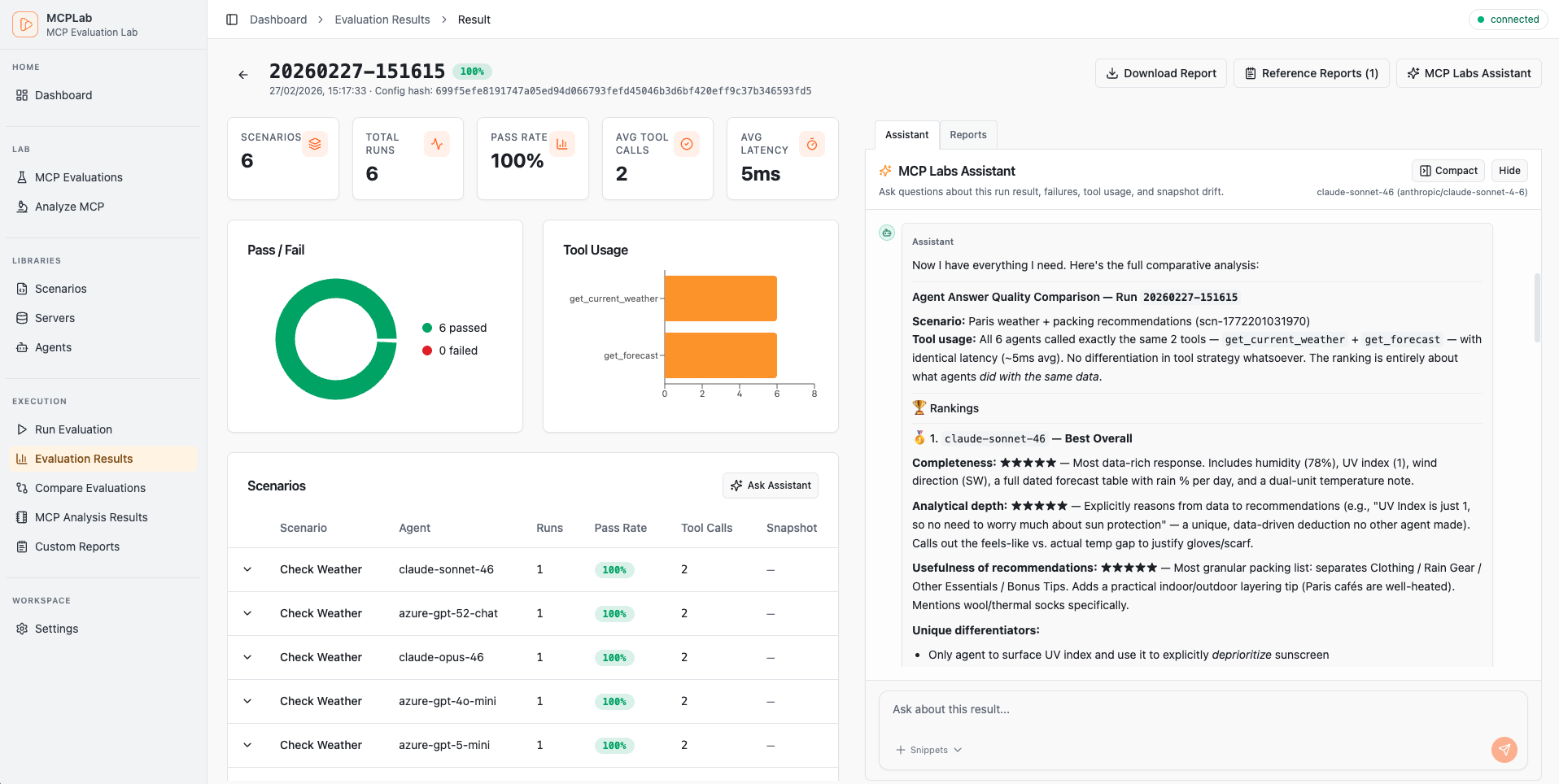
Learn more about Tracing Insights
Optional — Run MCP evaluations through Inspectr Command Runner
Section titled “Optional — Run MCP evaluations through Inspectr Command Runner”For local automation or CI, you can let Inspectr start and stop the MCPLab command for you.
Example: Run MCPLab via Inspectr
Section titled “Example: Run MCPLab via Inspectr”inspectr \ --backend http://localhost:3000 \ --export \ --command npx \ --command-arg @inspectr/mcplab \ --command-arg run \ --command-arg -c \ --command-arg my-eval.yamlIn this setup:
- Inspectr starts automatically
- MCPLab is launched by Inspectr using
--commandand--command-arg - MCP traffic is captured while the eval runs
- a JSON export is written when the command completes
Summary
Section titled “Summary”Testing MCP servers across models, clients, and environments requires more than pass/fail checks.
By combining:
- MCPLab for E2E MCP evaluations
- Inspectr for runtime visibility and exports
you get:
- confidence that your MCP server works consistently across models
- visibility into MCP runtime behavior during each eval
- inspectable artifacts you can store and compare over time
- zero changes required to your MCP server implementation
This setup scales from local development to CI-based MCP regression testing.
Together, MCPLab and Inspectr form a complete MCP testing and observability workflow.